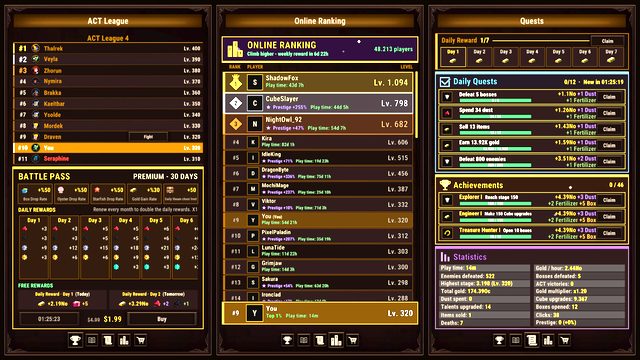
Steam items: sell them or bank them
Two doors, one choice. Selling on the Steam Community Market turns a chest item into wallet credit; adding it to the Steam Collection removes it from your inventory for good and raises that slot's permanent bonus for the whole team. Collection bonuses stack with Cube Upgrade and Talent Tree percentages.
Task Bar Cube gives you two ways to spend a chest item, and they pull in opposite directions. One turns it into money in your Steam wallet. The other deletes it from your inventory forever for a permanent team bonus. Neither is wrong, but the game will not tell you which to pick.
The two doors
| Steam Community Market | Steam Collection (in game) | |
|---|---|---|
| What you get | Wallet credit, at whatever the item sells for | A permanent percentage bonus for the whole team |
| What you lose | The item | The item, permanently, with no undo |
| Who benefits | You, outside the game | Every hero and pet you own |
| Timing | Immediate, subject to Steam's own rules | Immediate and permanent |
The store page advertises the market side — every item inside a chest can be sold on the Steam Community Market — and the collection panel advertises the other in equally plain language: each item is removed from your Steam inventory for good and permanently boosts its stat for your whole team.
How the Steam Collection actually works
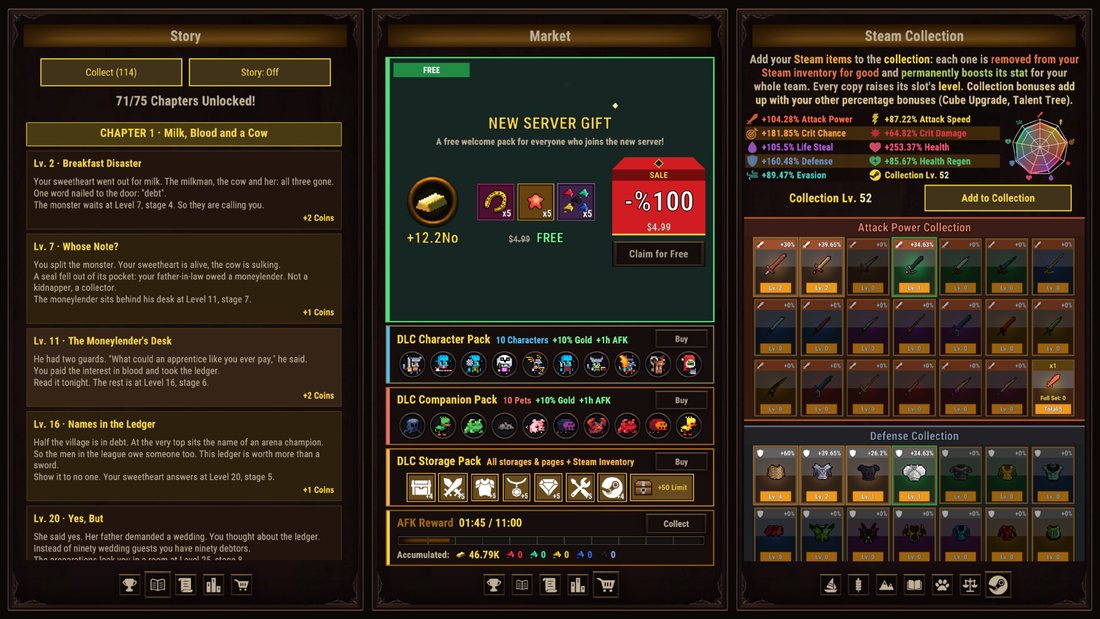
The panel's own description is the best source, and it contains four facts worth reading twice:
- Items are consumed. "Removed from your Steam inventory for good" is literal. There is no reclaim, no refund and no swap.
- Every copy raises a slot's level. The bonus is not a one-off for a single item; duplicates of the same kind keep raising the same slot.
- The bonus is team-wide. Not a hero, not a pet — the whole team.
- It stacks with your percentages. The panel says collection bonuses add up with your other percentage bonuses, naming Cube Upgrade and Talent Tree specifically.
That last point is the reason to take the collection seriously rather than treating it as a junk drawer. If your Cube Upgrade bonus and your collection bonus are additive, then the collection is a second multiplier source that costs you nothing but inventory items you were going to sell for pocket change.
The tabs are split by stat family — the screenshots show an Attack Power collection and a Defense collection — each with its own level and its own set of slots. The panel reads like a stamp album: one slot per item type, level it up by feeding copies.
When selling is the right call
Sell when the item cannot help you:
| Case | Sell? | Why |
|---|---|---|
| Below your current rarity floor | Yes | It is not worth a slot or a ladder step |
| Stat lines your team cannot use | Yes | Attack Power on a tank line is dead weight |
| Seventh rarity duplicate | Yes | The rarity ladder has nowhere to go |
| Item for a class you do not run | Usually | Unless it fills a collection slot you are levelling |
| Anything that beats worn gear | No | Equip it, always |
The market is also where the ceiling is: rarity and tier both raise what an item earns, so the items you would most want to keep are the ones that fetch the most. That tension never fully resolves, which is the design working as intended.
Steam's side of the deal
The Market is Valve's, not DarkRook's, so its rules apply unchanged: your Steam inventory has to hold the item, listing and buying need your Steam account in good standing, Valve takes its transaction cut, and sale proceeds land in your Steam wallet rather than your bank.
Two practical notes. Items you just received can be subject to Steam's usual trade and market holds, so a freshly dropped item may not be listable immediately — the inventory item's own page is the authority, not a guide. And prices for a game that launched on 25 October 2026 are still shaking out; a listing price from day one is not a valuation, it is a guess.
The collection, by contrast, is untouched by all that
Collection bonuses exist inside the save. They do not care about Steam holds, market fees or what other players are paying, which makes the collection the safer door for anyone playing the game as a game — and why this site's default for anything you are unsure about is: bank it.
You can always sell later. You cannot un-consume.
A simple policy that works
- First two weeks: bank everything into the collection unless it is a duplicate you need for a rarity step. You are still learning what your team needs, and collection levels are permanent.
- After that: sell anything that fails the two tests — beats worn gear, or fills a collection slot.
- Never sell on impulse from the chest window. Move it to inventory, look at your team, then decide.
- Check the collection tab first. If a slot is one copy away from a level, that copy is worth more as a stamp than as a sale.
Why the choice repeats every session
The interesting part is that it never resolves. Every chest asks the same question, and both answers are defensible depending on what your team needs this week: a player pushing the rarity ladder wants inventory copies, a player who has stopped climbing wants wallet credit.
What it does punish is indecision. Items left in Steam storage block transfers once a page fills, and unsold items lose value as the launch-week market cools. Decide per chest, not per month.
What the collection is not
It is not a source of gear. Consuming an item does not socket it, wear it or store it — the stat bonus is an abstract percentage, and the item itself is gone. Players who expect the collection to hand back something wearable are the ones who feel cheated by the confirmation dialogue.
It is also not a replacement for the rarity ladder. Both eat duplicates, and they compete for the same pile. The split that works: duplicates of your current best item type go to Rarity Upgrade, everything else goes to the collection.
Reading the market like an idle player
The temptation is to treat the market as passive income. It is not — it is a second inventory with its own holds, fees and price discovery. If your goal is progress, the collection is faster, permanent and free of paperwork. If your goal is a wallet that pays for the next game, sell the surplus.
Either way, the chest timer keeps running. Five minutes per chest, whether you are selling, banking or doing neither. The chest page has the published rates; this page is only about what to do once the item is in your hands.