Heroes, pets and the talent tree
Your party is five classes plus companions. Each class brings its own combat skill, and every hero has a Talent Tree whose points you can take back by right-clicking a node. Pets fill their own slots and are boosted by the Animal Shelter shelves rather than the character ones.
Your party is the part of Task Bar Cube that fights while you are not looking, so it deserves more attention than the clicker gets. The store page keeps it short: heroes and pets, five classes each with its own combat skill, a Talent Tree and Hero Skills to shape every hero, and two shelf systems that buff the two halves of the team differently.
Five classes, one skill each
The game ships five character classes. Each has a combat skill of its own — the store page's wording is "five classes, each with its own combat skill" — and each hero is an individual, not a generic unit: it has a name, a class, its own level and its own skill points.
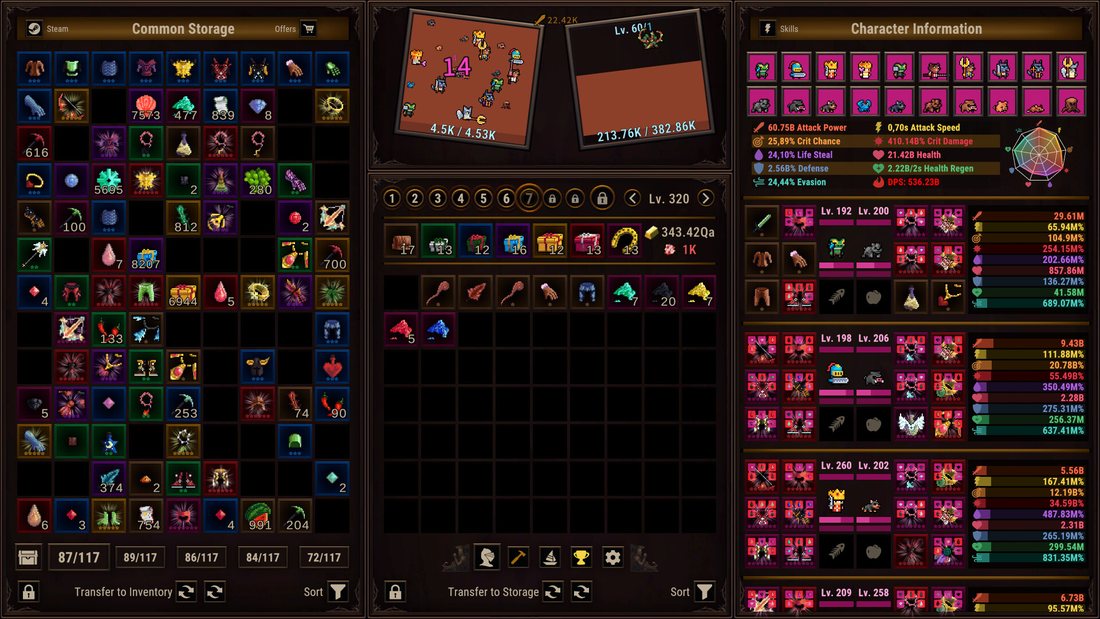
The party screen in the official screenshots shows this mix directly: a Warrior, a Priest and a Rogue among the character slots, each with a level in the low hundreds, plus beast companions in separate pet slots. That is a sample of a live save, not a roster — the game does not publish a class list or a hero table, and this site will not invent one. What it does publish is the mechanic: five classes, one skill each, and per-hero progression.
What that means in practice: a class is a role plus a button. The role decides where the hero sits in a fight, and the button is what the hero does when its skill fires. You are not picking a build from a wiki; you are picking which role you want more of.
Talent Tree and Hero Skills: two different pools
The panel splits hero growth into two tracks, and they behave differently.
| Track | What it is | How you spend it | How you undo it |
|---|---|---|---|
| Hero Skills | The hero's own skill levels | Points earned with character levels | Respect the pool; check before committing |
| Talent Tree | A tree of nodes per hero | Points, one click per node | Right-click removes a point |
The instructions are printed on the panel itself: left click to choose or add a point, right click to remove a point. That single line makes the whole system forgiving — you can experiment, take a point back, and try a different branch without paying anything.
What you cannot do is spend more points than you have. The counter on each hero shows points spent against points available, and in the screenshots a hero in the low two-hundreds is holding a pool in the hundreds. So the tree is not a scarce resource in the early game; it becomes one when a hero's level starts outpacing the nodes that matter.
Two rules that hold regardless of class:
- Take a point back before you take a new branch. Since removal is free, there is no reason to leave a point in a node you have outgrown.
- Spread early, concentrate late. Early on, one point in several nodes shows you what each does. Later, the marginal point is worth more in the node you already invested in.
Pets are a separate system, not accessories
Pets have their own slots, their own levels and their own buff source. They are not gear and they are not a second talent tree — they are a parallel team that fights alongside the heroes and is upgraded through a different panel.
The split that matters:
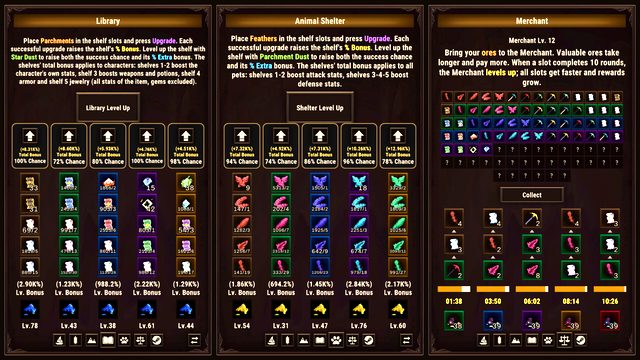
- Pets are boosted by the Animal Shelter shelves, where the early shelves lift attack stats and the later ones lift defense.
- Characters are boosted by the Library shelves, where the first two shelves lift the character's own stats, the third lifts weapons and potions, the fourth armor and the fifth jewelry.
- Gems are excluded from the Library's item bonuses, which is stated on the panel and is easy to miss when you are counting percentages.
So the two shelf halls are not duplicates of each other. One is your pets' progression curve, the other is your characters' — and both run on the same loop: put a consumable in a shelf slot, press Upgrade, and each success raises that shelf's bonus, with dust raising both the success chance and the extra bonus.
Which hero to invest in
There is no published tier list and the game does not rank its classes, so the honest answer is structural rather than a ranking:
| If your problem is | Invest in | Because |
|---|---|---|
| Fights end slowly | The hero with the highest attack stat line | Attack Power and Crit Damage roll on gear, not class |
| Heroes die | Pets' defense shelves and the character's own defense nodes | Defense is available to every class |
| Gold is the bottleneck | Whatever kills fastest, not the tankiest | Gold comes from kills |
| Nothing feels strong | The Talent Tree on the hero you actually watch | Free respecs make this zero-risk |
The one rule worth holding: your gear carries the stats, your class carries the role, and your talent points carry the shape. Changing class is not a thing you do; changing where the points sit is, and it is free.
Party size and what a slot is worth
Five classes exist, and the party screen fills a row of character slots with individuals rather than generic units. What matters for a beginner is that a slot is a permanent investment of levels: a hero you have never opened the talent tree on is still gaining levels, and those levels are worth nothing until the points are spent.
That is why the talent pass matters more than it looks. A party of five heroes with unspent points is a party playing at a fraction of its own numbers, and the fix costs nothing but two minutes. The same logic applies to pets: a pet slot with no shelf support behind it is an empty slot with a health bar, which is why the shelter shelves and the pet slots should always be read together.
The panel routine
Once per session, in this order:
- Check levels on the party screen — anyone who levelled has points to spend.
- Spend the points, then right-click anything that has stopped pulling its weight.
- Check the Library and Animal Shelter shelves for a success sitting at 100% chance that you have not pressed.
- Look at the collection tab if you are holding duplicates — collection bonuses stack with talent and upgrade percentages, and they are team-wide.
- Only then go back to the clicker.
That is two minutes of management for a party that fights for the rest of the day. The rest of the growth — the hundreds of Cube Upgrade nodes and the Prestige loop — lives on the upgrades page, and the gear those heroes wear is on the rarities page.