How to play Task Bar Cube
Install it free from Steam, run it, and drop the window down onto your taskbar. Heroes keep fighting with the game minimised, and a Steam chest lands every five minutes of play. Hover the enemy cube to attack, spend gold in Cube Upgrade, and read the character panel for the stats that matter.
Task Bar Cube asks two things of you: put the window somewhere you can ignore, and come back when there is something to spend. Everything else the game does by itself. This page is the tour — install, the two ways to run it, what fights while you are away, which panels matter, and how the first chest should be handled.
Install, launch, and the one setting worth changing
It is a free download from Steam (appid 5084200), roughly 2 GB on disk, and it starts straight into the game with no launcher and no account beyond Steam itself. Store requirements are modest — Windows 10, an Intel Core i3, 1 GB of RAM, a GeForce GT 730 — because this is a game meant to sit on a work machine.
The setting that matters is the window mode. The game is built to be shrunk. Drag it down so only the strip you care about shows, or run it in a small window in a corner. The interface scales down to that size rather than becoming unusable, which is the whole design premise: it lives on the taskbar, the way a music player does.
Taskbar window or fullscreen
| Taskbar window | Fullscreen | |
|---|---|---|
| Best for | Background progression while you work | Reading panels, fusing gear, managing inventory |
| What you see | The fight and a few readouts | Everything: character sheet, skills, storage pages |
| Fighting | Continues while minimised, driven by your party | Same, plus you can hover the cube to click |
| Chests | Arrive with play time | Same |
| Alt-tab | Untouched | Full attention needed |
Both modes feed the same save and chest timer, so you rarely choose for long: run it in the taskbar, and go fullscreen when a session turns into management.
What fights while you are not looking
Your party is the engine. Five character classes exist, each with its own combat skill, and each hero carries a Talent Tree and its own skills; companions fill separate slots. The store page is explicit that heroes fight on their own even while you are away, and the AFK reward panel backs that up with a running timer and an accumulated total.
The clicker layer sits on top and is optional. Hover the enemy cube and it takes damage automatically — that is a Cube Upgrade node called Click Power, which the game describes in those words: hover over the enemy cube and it attacks automatically. ## The panels you will actually live in
| Panel | What it does | Open it when |
|---|---|---|
| Cube Upgrade | Hundreds of upgrade nodes, no cap, each with a 50x buy button | You have gold and want more damage, more gold, faster attacks |
| Character Information | Attack Power, Crit Chance, Crit Damage, Health, DPS and the rest | You want to know whether a change helped |
| Character Skills / Talent Tree | Per-hero skill points, left click to add, right click to take back | A hero feels wrong or you just unlocked points |
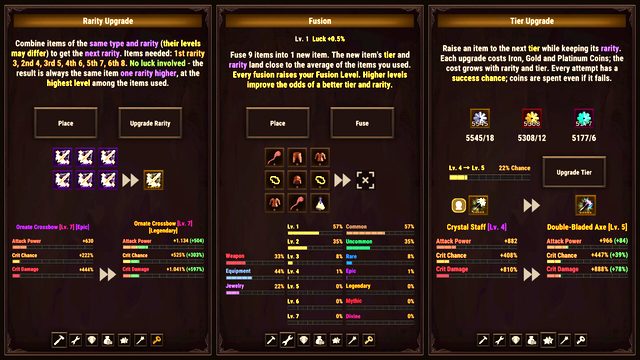
| Rarity Upgrade | Fusion, Tier Upgrade, Rarity Upgrade, Gem Socketing | Gear has stopped carrying you |
| Inventory / Steam storage | Your items, and the classes that hold them | Every chest, and before you sell anything |
| ACT League / Online Ranking | Rival bosses and the weekly board | When you want a target that survives a reset |
That is a lot of doors. The order in the beginner guide is deliberate: damage, gathering, gear.
Where gold comes from, and where it goes
Gold drops from enemies you kill — one node literally reads "increases gold earned from enemies" — and the amount scales with depth. Two other currencies matter earlier than people expect: Iron and Platinum coins, which are part of the cost of raising an item's tier.
| Currency | Comes from | Spent on |
|---|---|---|
| Gold | Enemies, offline accumulation | Cube Upgrade nodes, tier upgrades |
| Iron coins | Mining and progression | Tier Upgrade |
| Platinum coins | Mining and progression | Tier Upgrade |
| Ores | Mining slots | The Merchant, which converts them into rewards |
| Gems | Gear and drops | Gem Socketing |
The trap is spending gold on whatever node is nearest. Cube Upgrade is designed so that every node gets more expensive as it levels, which means the cheapest node is usually the correct next purchase — not the most exciting one.
Your first chest, handled correctly
Every five minutes of play gives you a Steam chest, and the contents are real Steam inventory items that can be sold on the Steam Community Market. When the first one lands:
- Open it and look at what dropped before touching anything.
- If an item beats what a hero is wearing, wear it. Do not sell an upgrade to buy a smaller upgrade.
- Do not fuse or sell duplicates early: Rarity Upgrade runs on them, so duplicates are materials, not trash.
- Leave the rest in inventory. Storage pages have limits, but nothing expires, and the sell-or-consume decision is worth a full read of the market page before you make it for the first time.
Reading the character panel
The character sheet is where you find out whether the gold did anything. It reports Attack Power, Crit Chance, Crit Damage, Attack Speed, Life Steal, Defense, Evasion, Health, Health Regen and a single DPS number for the hero. DPS is the one to watch, because it folds most of the others together.
Percentages on this sheet are additive with other percentage sources — the game says so when describing collection bonuses, which stack with Cube Upgrade and Talent Tree bonuses. And gear contributes through its own stat lines, so a lower-rarity item with the right stats can beat a higher-rarity one. Rarity is a ceiling, not a verdict.
Quality of life worth knowing
- Story can be switched off. The story panel has an on/off control, so the 8-chapter narrative stops interrupting the loop if you would rather just idle.
- Daily quests sit next to the story and are worth clearing because they are cheap.
- The chest tab shows a daily chest limit and a countdown to when that limit resets, so a marathon session has a natural stopping point.
If something is not working
The three failures people hit are interface, not bugs: the window is too small for the panel you want, the cube is not taking damage because Click Power is a purchase rather than a default, and the chest counter has stopped because the daily limit is spent. The FAQ covers the rest.